
Open a new appointment
Choose the right way to enter it.
What you will learn
- When to use Consulta Retroativa, Upload Automático or Cadastro Manual
- How to migrate history from another system without typing it all
Step by step
- 1
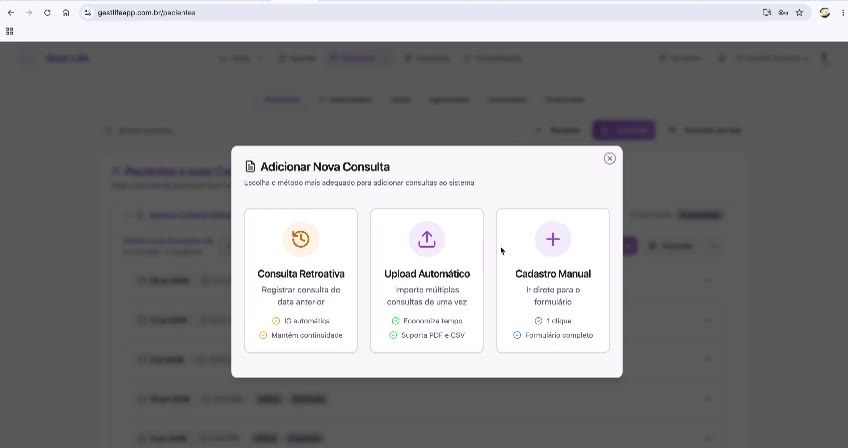
Click + Consulta on the Pacientes screen, or Nova Consulta under Ações Rápidas.
- 2
Choose Consulta Retroativa (backdated appointment) to record a visit from an earlier date.
- 3
Choose Upload Automático (automatic upload) to import several appointments at once (PDF or CSV).
- 4
Choose Cadastro Manual (manual entry) to fill in the full form now.
Speed shortcut
Why this matters
Picking the wrong method is what makes a physician think the system is slow. Typing six old appointments one at a time takes half an hour; the same thing through Upload Automático takes a minute. That choice happens on this one screen.
Best practices
Always do it this way
- Appointment happening right now: Cadastro Manual.
- Visit that already happened and needs to enter the history: Consulta Retroativa.
- A pile of old appointments, or a migration: Upload Automático.
Common mistakes
I entered last week's visit as if it were today's.
Go deeper
Carry on here to see what comes before and after this step.