
Register a new patient
Create the record in a single form.
What you will learn
- What is actually required in order to save
- How the CEP (postcode) fills in the address by itself
- Why the emergency contact is not red tape
Step by step
- 1
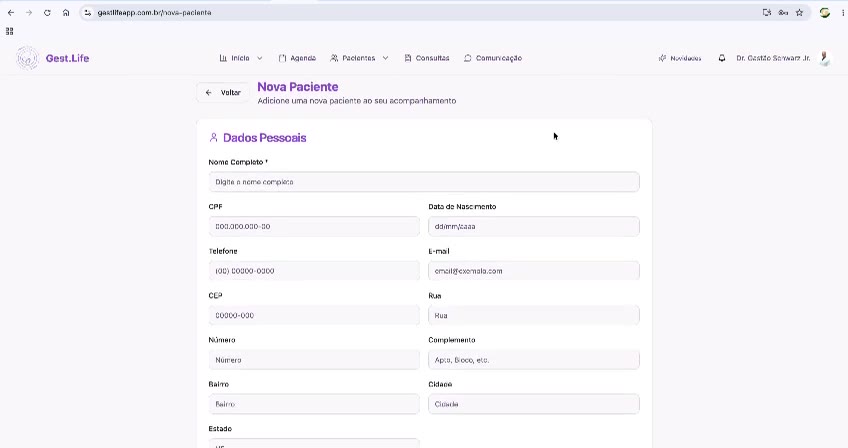
In Pacientes, click + Paciente.
- 2
Fill in Dados Pessoais (personal details): full name, CPF (Brazilian tax ID), date of birth, phone and e-mail.
- 3
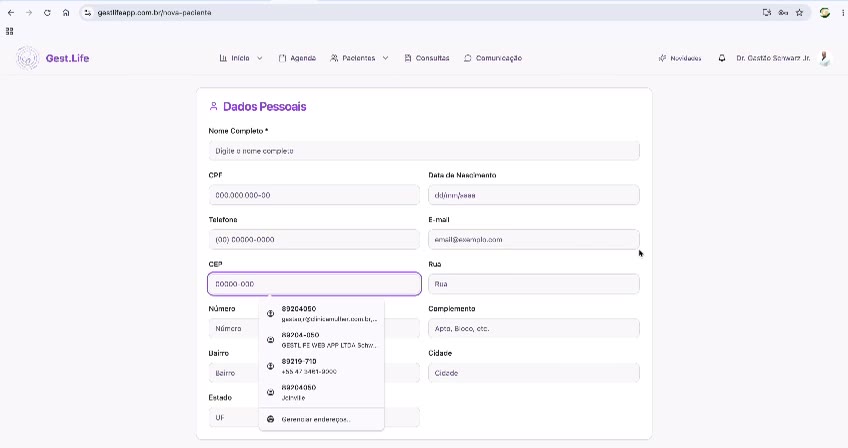
Type the CEP (postcode) — the system suggests and completes the address.
- 4
Scroll down to Contato de Emergência (emergency contact) and fill in name and phone.
- 5
Click Salvar (save).
Speed shortcut
Why this matters
The record is the base of everything that follows: gestational age calculation, return schedule, prescriptions and history. A record made in a hurry but with the right name and phone number is worth more than a complete record made three days later.
Best practices
Always do it this way
- Enter the phone with the area code: that is how the team confirms appointments and returns.
- The emergency contact is critical in high-risk pregnancy — it takes 15 seconds and avoids a missed call during a complication.
- Double-check the date of birth: maternal age feeds into the risk assessment.
Common mistakes
The address didn't complete after the CEP.
I registered the same patient twice.
Go deeper
Carry on here to see what comes before and after this step.