Read the dashboard in 10 seconds
Know what needs your attention today without opening anything.
What you will learn
- What each of the four cards at the top answers
- Where the system flags that something is pending
- Where to start your day in one click
Step by step
- 1
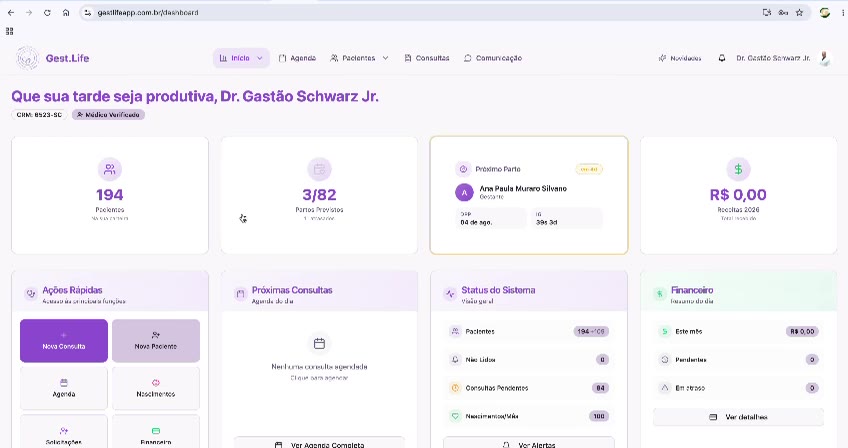
Read the four cards at the top: Pacientes (patients), Partos Previstos (expected births), Próximo Parto (next birth) and Receitas (prescriptions).
- 2
Check 'Próximas Consultas' (upcoming appointments) for today's schedule.
- 3
Look at 'Status do Sistema' (system status) for pending appointments and unread alerts.
- 4
Use 'Ações Rápidas' (quick actions) to get going: Nova Consulta (new appointment) or Nova Paciente (new patient).
Speed shortcut
Why this matters
The dashboard was designed to answer three questions before you open any record: who is coming today, which birth is close and what was left pending. Skip that reading and you find the pending item mid-appointment, when fixing it costs more.
Best practices
Always do it this way
- Open the dashboard at the start of the shift and read 'Status do Sistema' before the first patient.
- Treat 'Partos Previstos' as your planning window for the coming weeks, not as a statistic.
- If a number looks odd, click it: every card leads to the list it came from.
Common mistakes
The numbers don't match the patients I saw.
Go deeper
Carry on here to see what comes before and after this step.